
DevlogFeature13 min read
How Felucca draws a pixel
A long read about the renderer: pixel-art sprites that remember their shape in 3D, real lights and shadows on them, a coarse voxel copy of the world that keeps lamplight inside rooms, and the week we spent finding where a town's frame time went and getting it back.
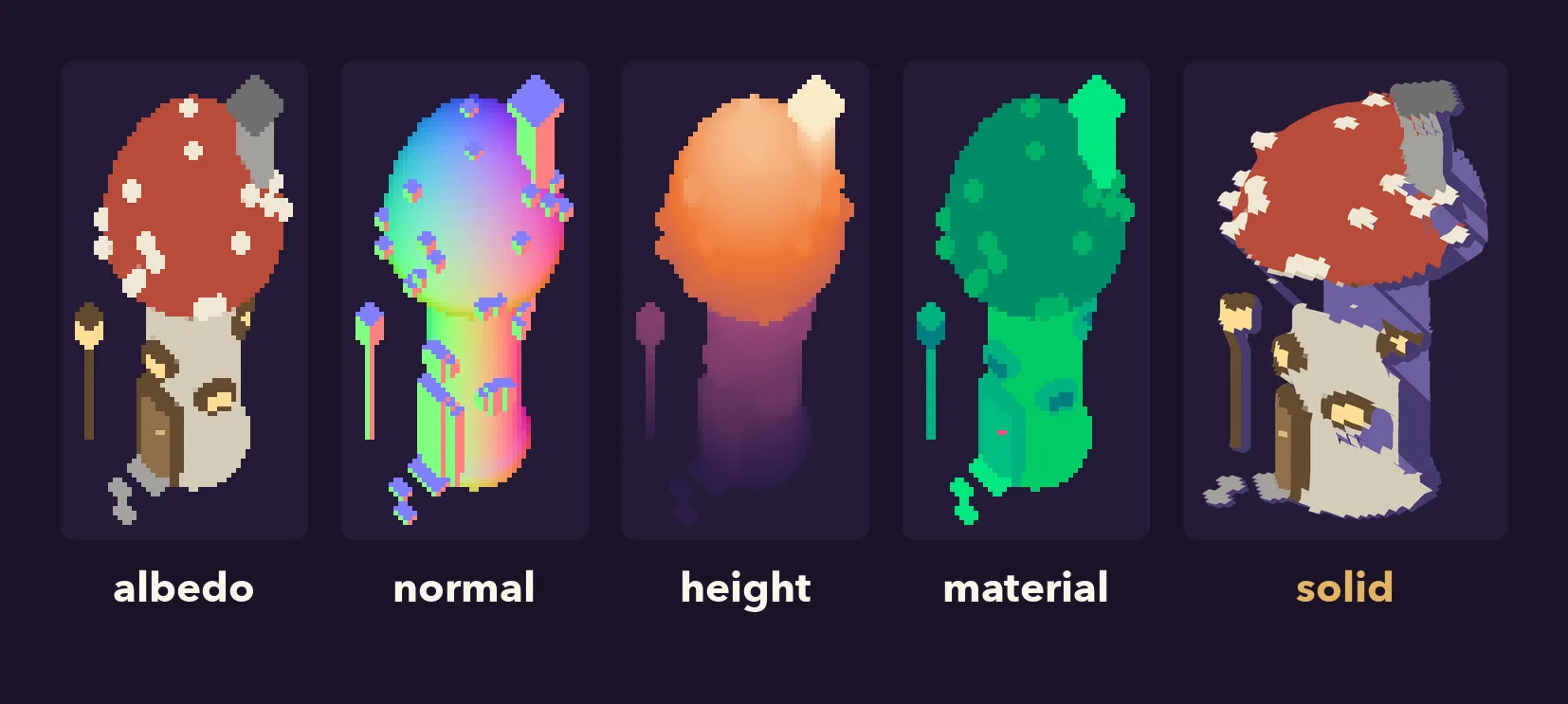
Felucca looks like a pixel-art game from the late nineties, and in a way it is one: every house, barrel and tree on screen is a small hand-sized picture, drawn at one pixel per sprite texel and scaled up by a whole number. But the light that falls on those pictures is not painted in. The sun moves, lanterns glow at night, a house throws its shadow across the street and the shadow bends over the kerb. A lamp post stands in front of one half of a wall and behind the other, and the candle in a room lights the room, not the street behind its wall.
This post is about how that works, from the moment an object is modelled to the moment its pixels reach your screen, about the second, coarse copy of the world that light now travels through, and about the week we just spent measuring every millisecond of a frame in a town and taking a good part of them back. It is long and it has code in it. Every picture is either the game itself or drawn by our own code from the game's data. The cover is one sprite, the fey mushroom house, taken apart: its colour, its surface directions, its height, its material, and the solid shape those maps describe, seen from a side the game's camera never shows.
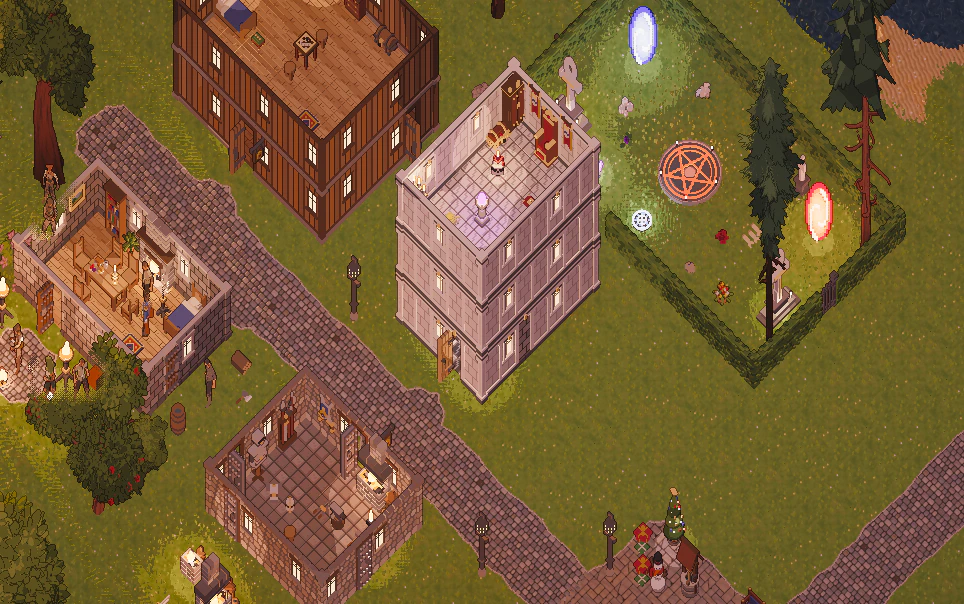
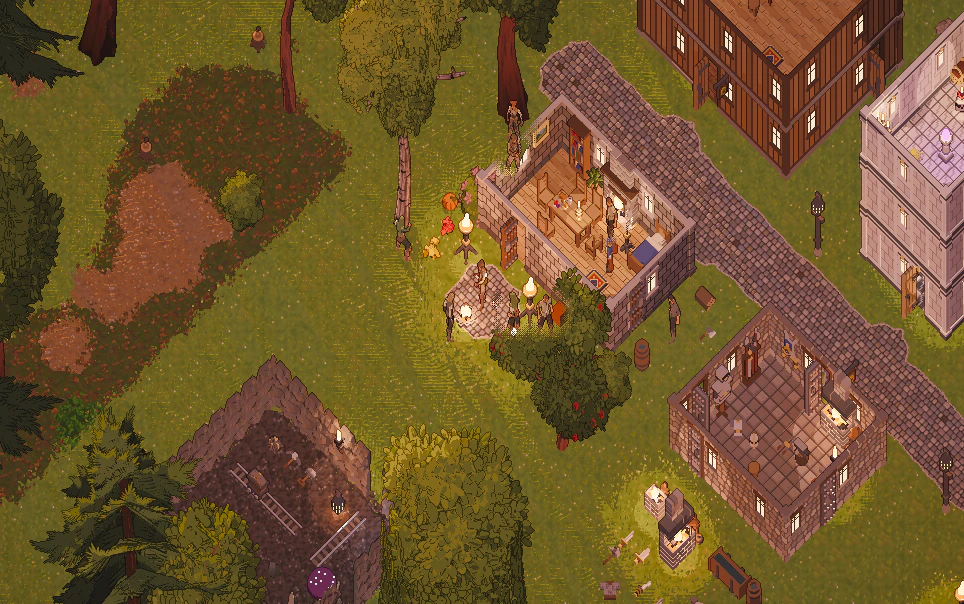
Both captures are the game as it ships, at 18:00 with the default settings; we only lifted the roofs (a view option in the game) so you can see inside.
Sprites that remember their shape
Every object starts as a 3D model in Blender. We do not ship the models. A bake turns each one into a sprite sheet seen from the game's camera, and the sheet holds more than colour. For each texel it stores seven things:
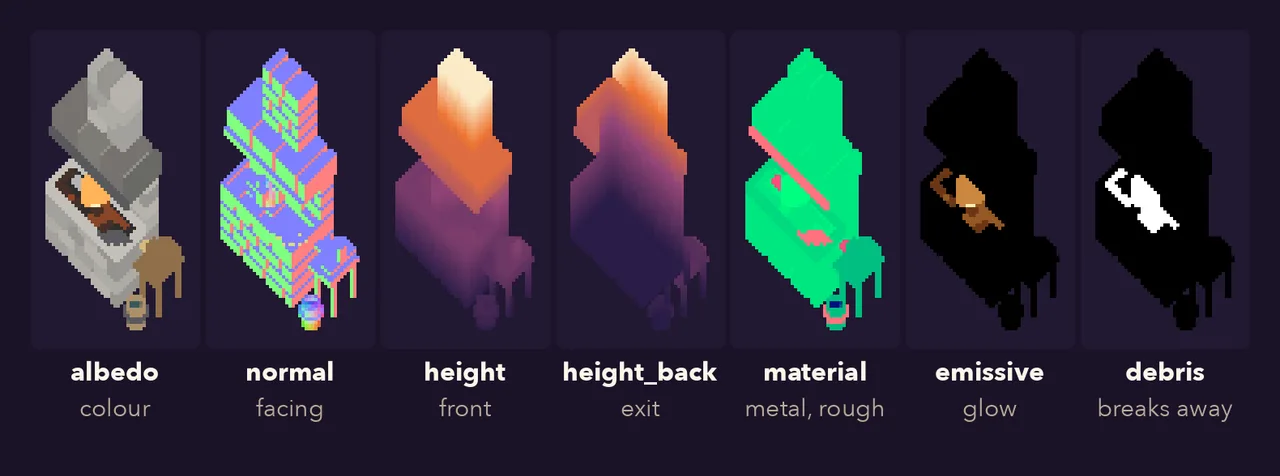
- albedo: the colour, with a hard alpha edge (a texel is either there or not);
- normal: which way the surface faces, in game space;
- height: how high above the ground the visible surface is;
- height back: how high the ray is when it leaves the object on the far side, so the sprite knows how thick it is;
- material: metal and roughness, for the glint on an anvil;
- emissive: glow, for forge fire and lit windows;
- debris: which texels disappear when the object breaks (flames, leaves) instead of falling as chunks.
A small JSON file says how to read them:
{
  "version": 3,
  "name": "forge_large_s",
  "frame_w": 47, "frame_h": 93,
  "anchor": [15, 63],
  "height_range": 2.33,
  "footprint": [2, 1],
  "emissive_scale": 10.0,
  "has_back": true,
  "has_debris": true
}
anchor is the texel where the object meets the ground; height_range turns the 16-bit height
values into world units. Everything else in this post follows from those maps.
One camera at 45 degrees
Ultima Online drew its world in an oblique projection: the ground and walls are both drawn at full size, nothing shrinks with distance, and a one-tile-tall wall is as tall on screen as a tile is deep. We wanted the same feel (#14), but with a real 3D scene underneath so that light behaves.
The trick is that this projection is exactly an orthographic camera tilted 45 degrees down, whose picture is then stretched vertically by √2. At 45 degrees, a step along the ground and a step up a wall both reach the image at 0.707 of their length; stretching by √2 gives both their full size back.
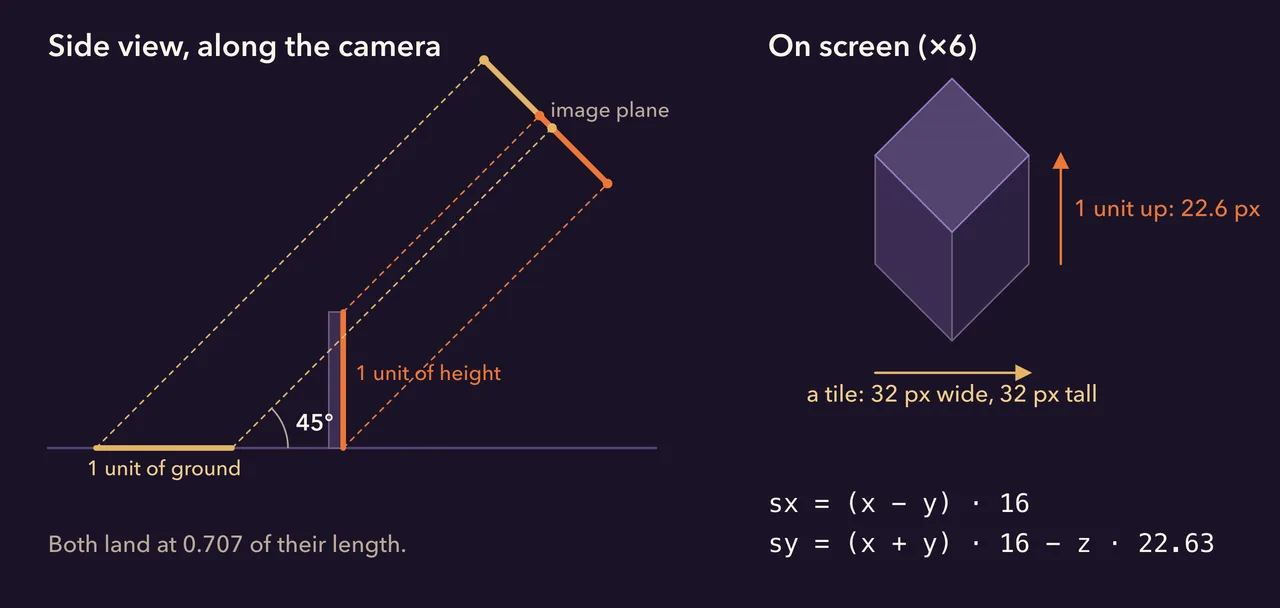
The whole game agrees on one tiny function, and nothing else is allowed to do projection maths:
pub const TILE_W: f32 = 32.0;
pub const TILE_H: f32 = 32.0;
pub const HALF_W: f32 = TILE_W / 2.0;
pub const HALF_H: f32 = TILE_H / 2.0;
pub const PX_PER_UNIT: f32 = TILE_W / std::f32::consts::SQRT_2; // 22.63
pub const Z_PX: f32 = PX_PER_UNIT; // height and ground at the same scale

pub fn world_to_screen(x: f32, y: f32, z: f32) -> (f32, f32) {
    ((x - y) * HALF_W, (x + y) * HALF_H - z * Z_PX)
}
The baker uses the same numbers (it refuses to bake if its camera is more than 0.05 px off), so a sprite's texels land on the same grid in the game as in Blender.
Flat quads with true depth
The obvious way to draw sprites is to sort them back to front and paint them over each other. It breaks the moment two objects overlap in a way a single "which one is in front" cannot describe: a lamp post standing in front of the lower half of a wall but behind its gable, a character walking through a doorway, a tree whose branches reach over a roof.
We draw every sprite as an impostor instead (#19): a flat rectangle facing the camera, inside Bevy's ordinary 3D scene. The rectangle itself is a lie, but its fragment shader is not. For each texel it reads the height, finds the point on the camera ray at that height, and writes the depth of that point, not of the rectangle:
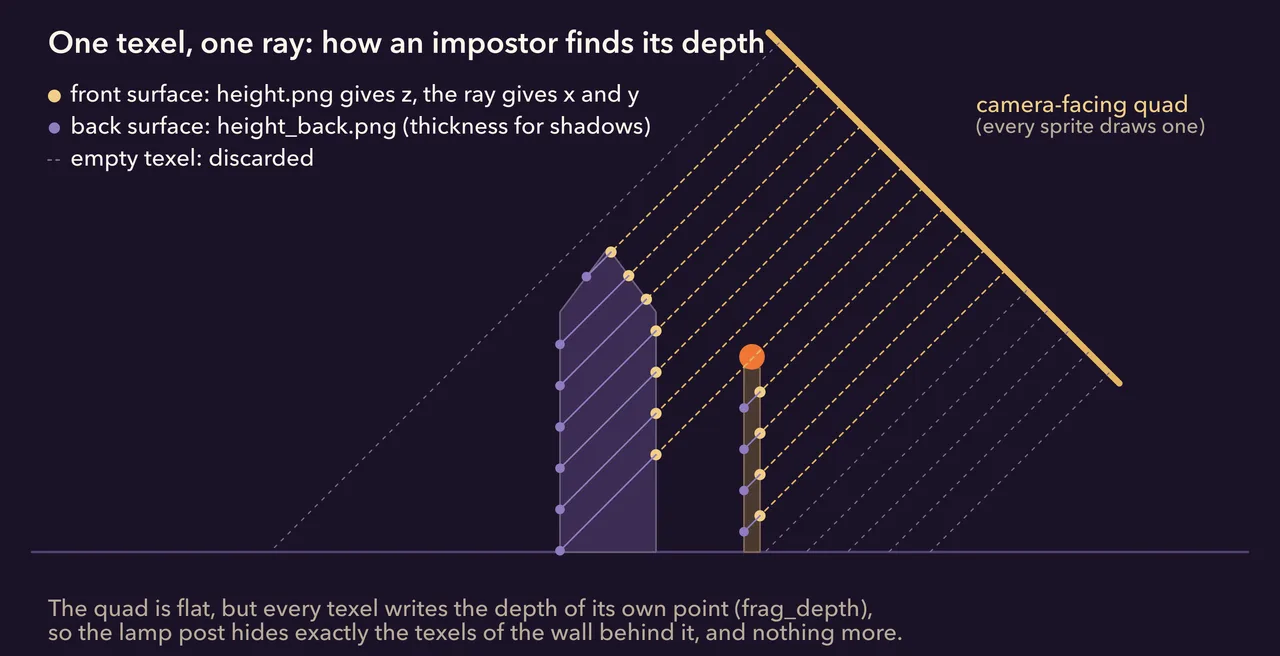
Here is the heart of it, trimmed from impostor.wgsl:
let albedo = textureLoad(albedo_tex, coord, layer, 0);
if albedo.a < 0.5 {
    discard;                       // an empty texel: nothing here
}
let n_game = textureLoad(normal_tex, coord, layer, 0).xyz * 2.0 - 1.0;
let h = textureLoad(height_tex, coord, layer, 0).r;

// Texel centre, `up_px` pixels above the anchor: walk along the view ray
// until the ray is at height h.
let center = f.origin + texel + 0.5;
let up_px = -center.y;
let rise = h * f.height_range - SCREEN_UP.y * up_px / (PX * STRETCH);
s.local = plane_offset(center) + TO_CAMERA * (rise / TO_CAMERA.y);
s.position = anchor + s.local;
// ...
out.depth = depth_of(s.position);  // frag_depth: the texel's own depth
With a true position and a true normal for every texel, Bevy's lighting does the rest: the sun, clustered point lights, shadow maps. The game's debug views show what the GPU sees for one frame:
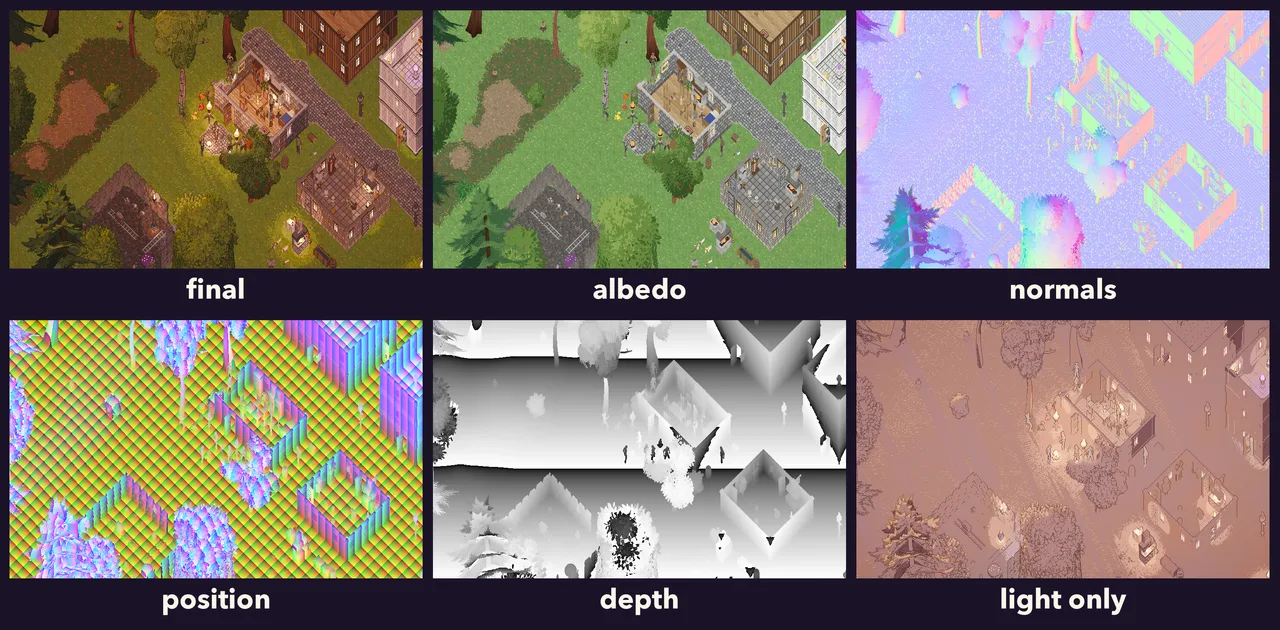
The position view is the proof of the idea: those colour bands are world coordinates computed per texel from flat sprites, and they run continuously across the ground, up the walls and over the floors and furniture inside.
One small story from this part. Writing depth from a shader has to be done twice, once in the depth prepass and once in the main pass, and the two must agree to the last bit. On Apple's GPUs the shader compiler rounds the two slightly differently, and a texel a hair further away in the main pass than in the prepass fails the depth test and leaves a black speck. The fix is one line: the main pass moves every texel 0.0008 units towards the camera (#73).
Shadows from shapes nobody sees
A flat rectangle cannot cast a proper shadow: from the sun's point of view it is a thin card. So every sprite frame also gets a shadow shell (#23, #25), a closed 3D mesh rebuilt from its two height maps. The front sheet comes from height, the back sheet from height back, and the two are stitched along every open edge. The camera never sees the shells; only lights do.
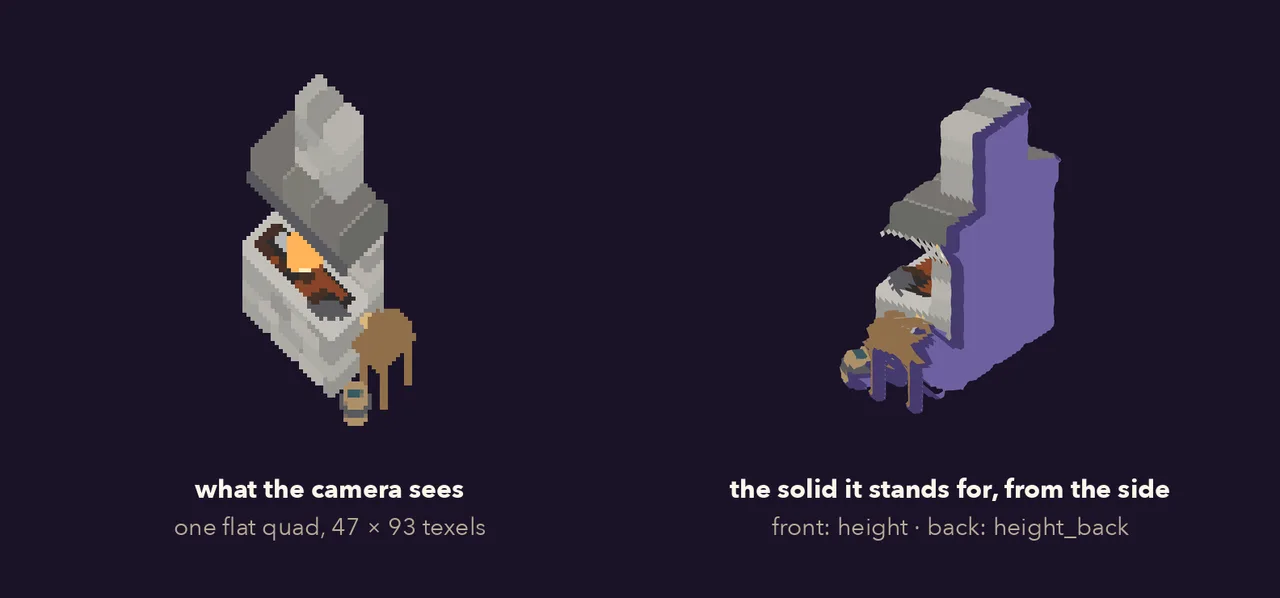
A shell built texel by texel has far too many triangles, so it is simplified within a fixed error (#65). This week that became three levels of detail, one per shadow quality (#119): each level may move the surface by about half a texel of the shadow map it is drawn into.
const SHELL_ERRORS: [f32; SHADOW_LODS] = [0.01, 0.02, 0.04]; // 2048², 1024², 512²

pub(crate) fn shell_lods(sheet: &SpriteSheet) -> ShellLods {
    let lod0 = shells_of(sheet);
    let coarser = |finer: &Vec<Option<ShellData>>, error: f32| {
        finer.iter().map(|s| s.as_ref().map(|(p, i)| {
            let simple = simplify_shell(p.clone(), i.clone(), error);
            // A frame that would simplify away keeps the finer shell.
            if simple.1.is_empty() { (p.clone(), i.clone()) } else { simple }
        })).collect()
    };
    let lod1 = coarser(&lod0, SHELL_ERRORS[1]);
    let lod2 = coarser(&lod1, SHELL_ERRORS[2]);
    [lod0, lod1, lod2]
}
In the settings window, shadow quality picks the shadow map and the shell level together, and switches while you play:
[graphics]
shadow_quality = "high"  # low | medium | high: map 512 / 1024 / 2048, shell LOD 2 / 1 / 0
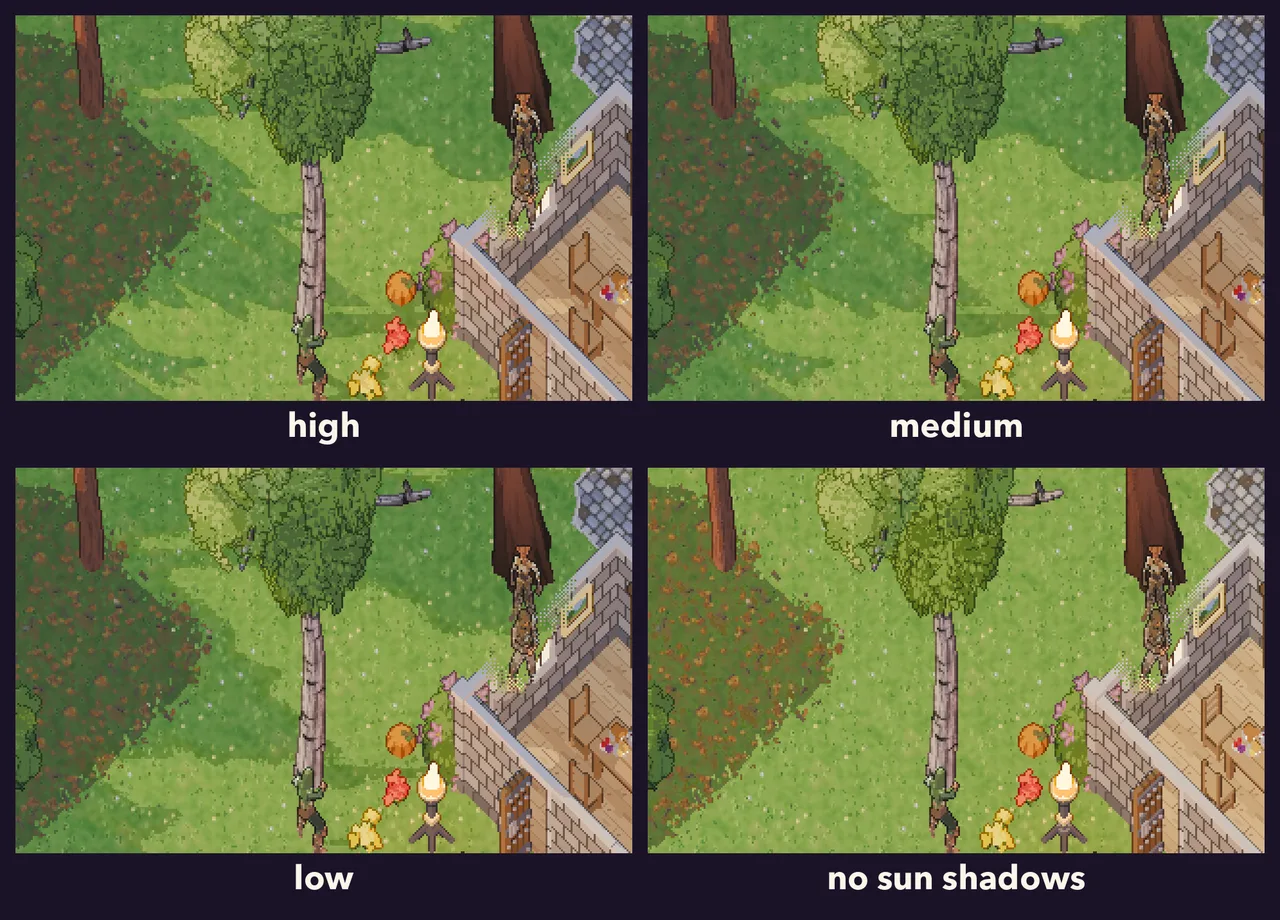
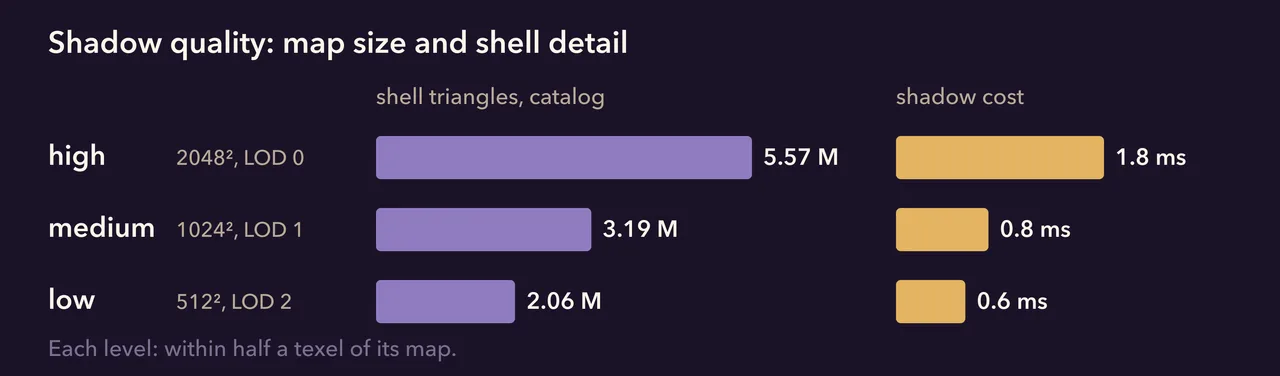
The picture barely moves: in a town, medium differs from high in 2 % of the pixels and low in 3.5 %, all along the edges of shadows. The comparison is taken at ten in the morning, when the shadows are sharpest: look at the birch's crown on the grass, where high keeps the gaps between the leaves and low rounds them into one patch. On our Apple M1 the shadows in Skartor cost 1.8 ms on high and 0.6 ms on low. The M1 is not short of triangles, so on weaker graphics the savings should count for more.
Small on purpose
The scene is rendered at texel resolution: one render pixel per sprite texel, so on a 2560 × 1600 window at zoom 4 the 3D scene is a 644 × 404 image (#29, #34). A single quad then shows it at four times the size with nearest filtering. Every expensive pass runs on a sixteenth of the pixels, and the pixel art cannot blur, because nothing is ever resampled by a fraction.
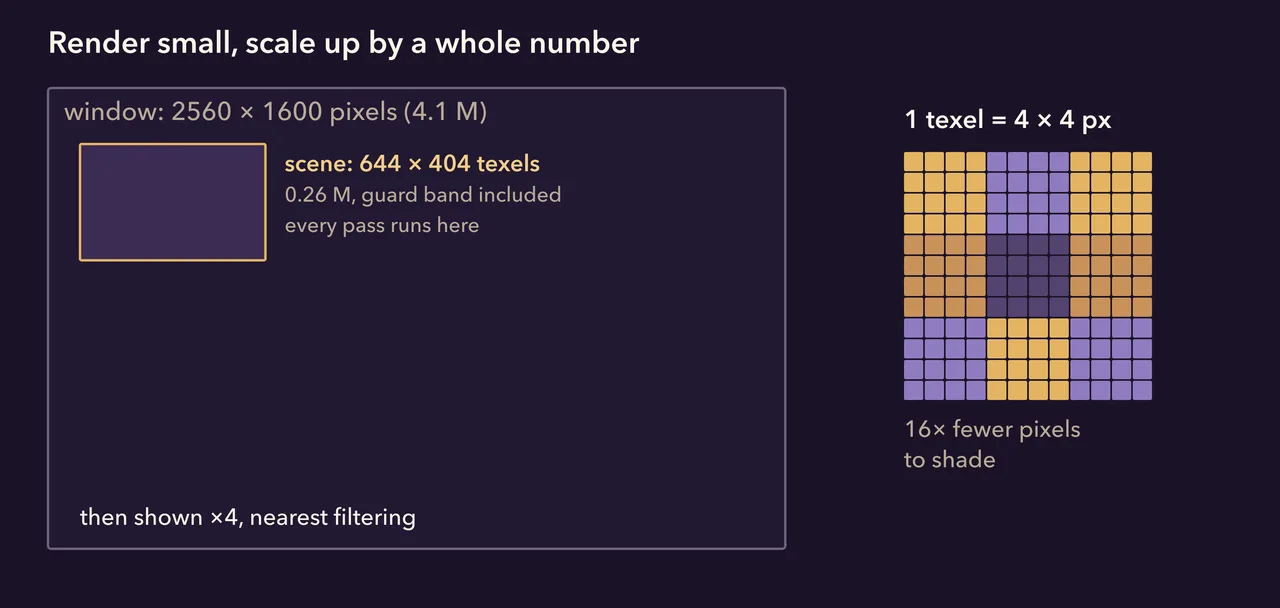
That 644 used to be 704. The render carried a 32-texel guard band on each side so that ambient occlusion and contact shadows could see things just off the screen. Ambient occlusion is gone (more below), so the band is now 2 texels, just enough for the outline pass to see each edge pixel's neighbour and for smooth scrolling to shift the image by part of a texel (#116). That is 22 % fewer pixels, and in Skartor the median frame went from 7.6 to 6.6 ms with a picture that changed only in single texels along shadow edges.
One atlas, one draw
Thousands of sprites on screen would be thousands of draw calls if each had its own textures. They do not (#64). Every frame of every loaded sprite is trimmed to its covered texels and packed into five texture arrays (albedo, normal, height, material, emissive) of 1024 × 1024 layers, and each gets one small record:
pub struct FrameRecord {
    pub atlas: UVec2,        // top-left texel of the trimmed frame in its layer
    pub layer: u32,
    pub height_range: f32,
    pub size: Vec2,          // trimmed size, texels
    pub origin: Vec2,        // trimmed rect relative to the sprite's anchor
    pub emissive_scale: f32,
    pub bare: u32,           // the same frame of the tree without its crown
}
All impostors share one material and one quad mesh; an entity only says which record to draw. Bevy batches the whole sprite layer into a handful of instanced draws.
This week we added a way to watch the atlas fill while the world streams in
(UO_DEBUG_ATLAS=1). It showed us something we had not expected:
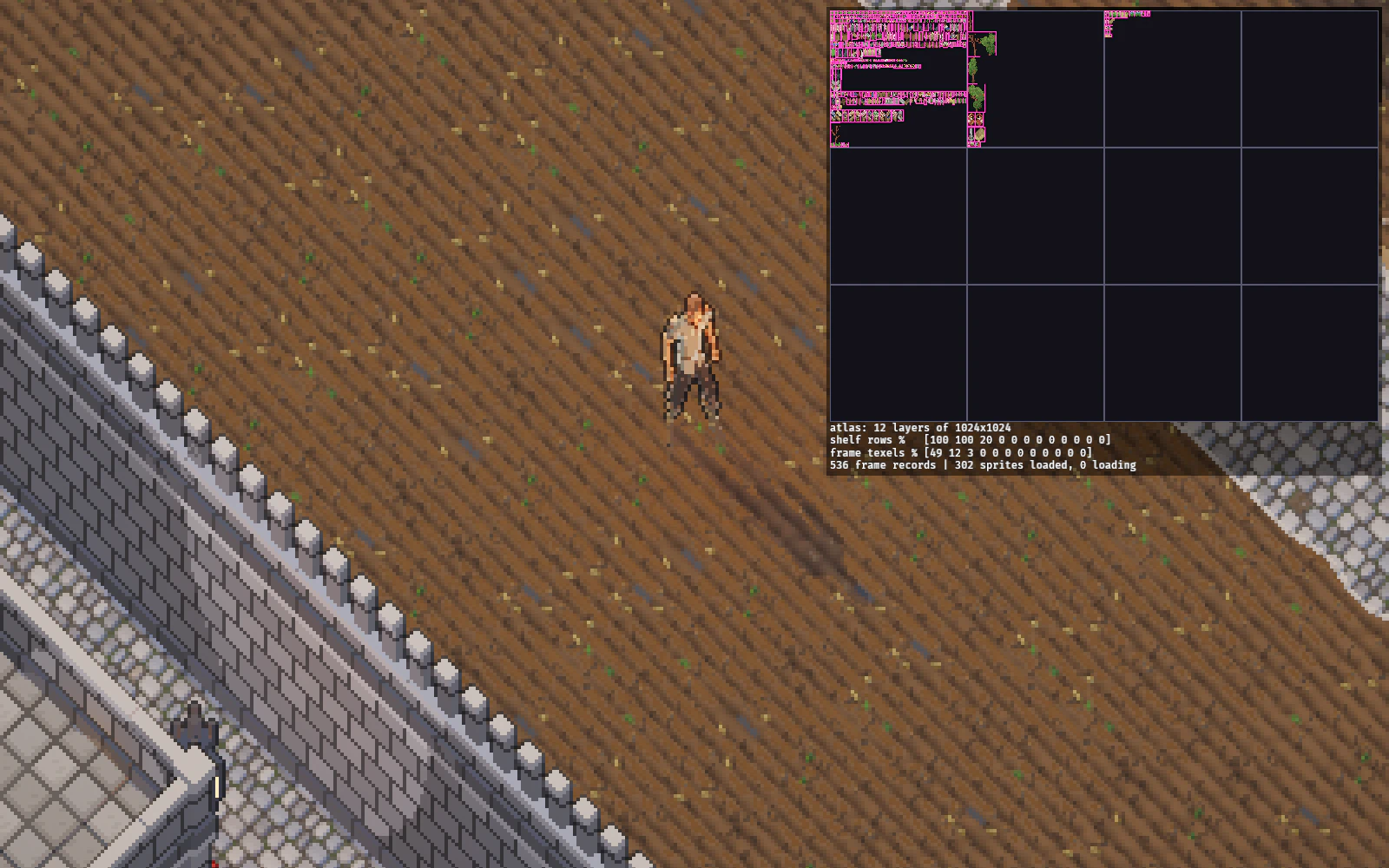
The packer works in shelves: rows of frames of similar height. Real-size trees are tall and all slightly different, so each one opens its own shelf across the whole layer. After a short walk the second layer is 100 % shelved and 12 % filled. It costs nothing yet (twelve layers are reserved up front), but it is the next thing to fix before the whole catalogue loads at once.
A frame, pass by pass
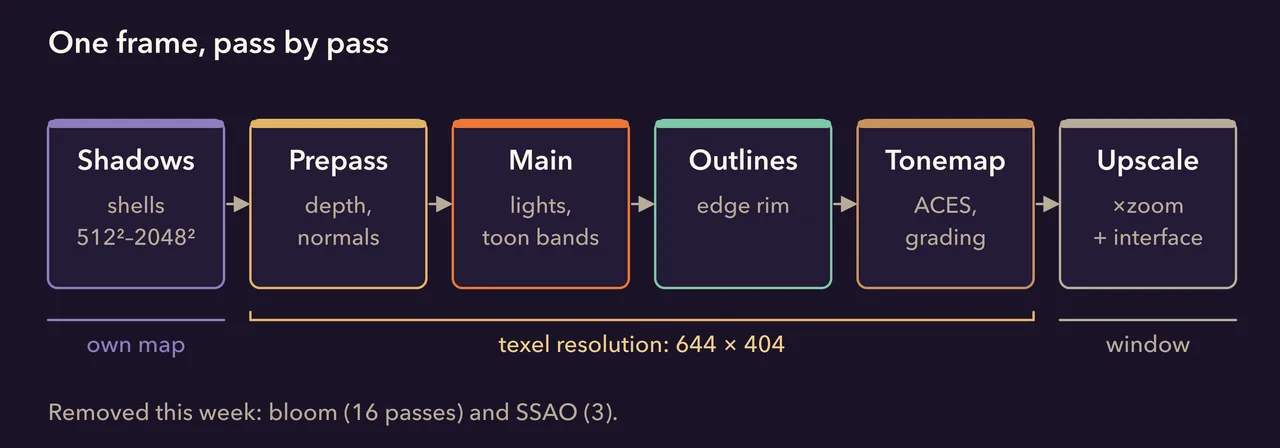
The main pass is Bevy's physically based lighting with a twist: incoming light is cut into a few hard bands before it meets the colour (#38), so light pools under a lantern come out as stepped rings and shadows have clean edges, the way a pixel artist would paint them. The outline pass then darkens a one-texel rim wherever a sprite stands out against something further back.
Light that stays in the room
Until this week, every flame, lantern and lit window was a point light: a point that lights everything within a few tiles. Point lights know nothing about walls. A candle in a house lit the street behind it; a forge lit the alley behind the smithy as brightly as the anvil. Skartor at night had 252 of them, and they were the biggest cost in its frame. So light now travels through a second copy of the world (#120), made of voxels: small cubes a quarter of a tile on each side that know whether they are stone, wood, leaves or air, what colour they are, and whether they glow.
Building that copy costs almost nothing, because the sprites already know their shape. The two height maps that give each sprite its shadow shell also give the solid between them, texel by texel, so every sprite frame turns into a brick of voxels without rasterising anything:
// Every covered texel: walk its view ray from the front surface to the back
// one and add the solid volume to the voxels it passes through.
for s in 0..steps {
    let t = t_front - (s as f32 + 0.5) * dt;
    acc.entry(voxel_of(q + TO_CAMERA * t)).or_default().solid += volume;
}
// A voxel is opaque once a slab 0.06 units thick crosses it: a two-texel
// wall (0.09) blocks light at every voxel size; leaves at most a third.
let opacity = share(a.solid).min(1.0).max(share(a.foliage).min(FOLIAGE_MAX));
The bricks of everything around the camera, plus the ground under it, fill a box 64 tiles wide. Light then moves through that box the way voxel cone tracing describes it: every half tile there is a probe that remembers how much light reaches it from each direction, and it learns that by looking along a dozen cones through ever coarser copies of the voxels. Each coarse copy keeps six versions, one for each direction a cone can travel, so a wall lit on its street side still looks dark from inside the house. Every texel on screen then asks the eight probes around it, but only the ones it can see: the game checks the voxels between the texel and each probe, and a probe behind a wall does not count.
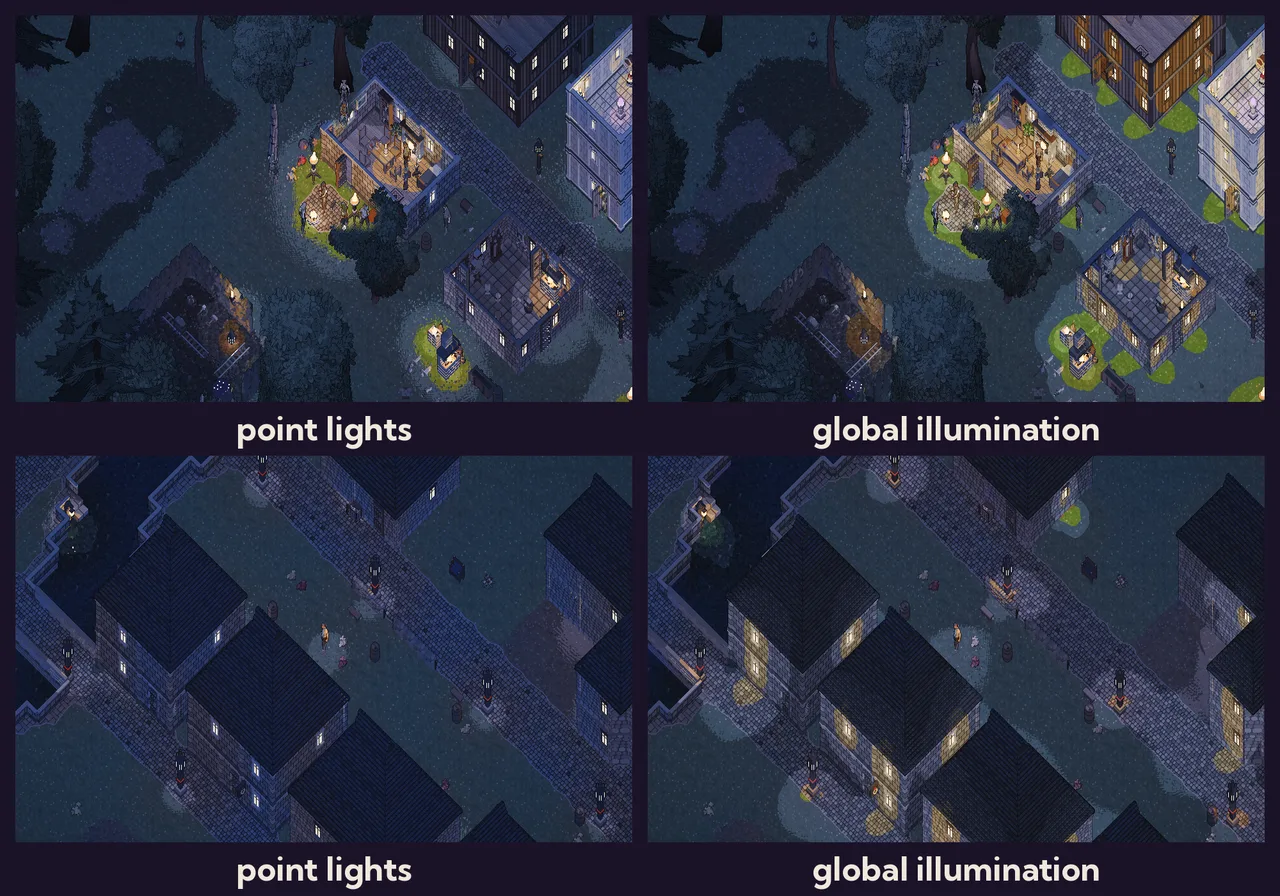
Lit windows now spill light onto the grass and the cobbles in front of them. A room is lit by its own candles and hearth, and the light stays inside the walls. The shade under a big oak is darker than the open field next to it, because the oak hides part of the sky.
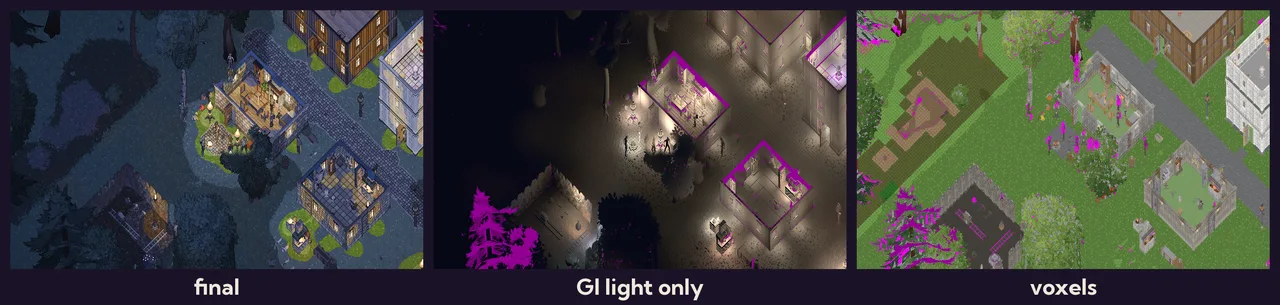
It is cheap because the world hardly changes. A sprite only changes its voxels when it is built, broken or opened. The box is cut into blocks of 8 × 8 × 8 voxels, and only a block where something changed is rebuilt. Only the probes near it look again, nearest the player first and on the player's own storey. When the sun has moved by a few degrees, everything is refreshed once in the background. Standing still in a quiet street, the lighting does no work at all. When an explosion broke the candles in a house, 42 blocks were rebuilt and about 300 blocks of probes looked again, over ten frames, and then everything was quiet.
How much work goes into a frame is set by time, not by count. The passes are timed on the graphics card itself, and the amount of work grows or shrinks towards a target (two milliseconds on the default setting). A faster card catches up with a change several times faster at the same cost to the frame.
One look-up per pixel. In the first version every sprite fragment asked its eight probes itself. But impostors write their own depth (see above), so the GPU cannot skip the texels that will end up hidden, and on a busy street it asked the probes for every layer of sprites: 2–3 ms. Now a small pass after the depth prepass asks once for each pixel on screen and keeps the answer, and the main pass reads one value. In the demo village at night the frame takes 6.8–8.1 ms with the new lighting, against 7.0–7.6 ms with the old point lights.
Two things needed tuning:
- Small lamps. A lamp's glass is a handful of texels, and physically that is very little light. The old point lights were made bright on purpose, so the glow of each sprite is scaled until it gives off as much light as its point light did. Then everything is doubled, because we wanted more light from torches and windows.
- Black night. The moonlit sky is only about two and a half times brighter than the level at which the banded lighting turns a texel black. Shade under a crown at night fell to pure black, with black dots on the ground. The light from the sky now never drops below that level, so the shade stays in the darkest moonlit blue.
The quality is a setting of its own, and the voxel size is part of it:
[graphics]
gi = "high"  # off | low | medium | high | ultra: voxels ½ / ¼ / ¼ / ⅛ of a tile, more cones and bounces
Off brings back the point lights for machines that cannot spare the voxels.
Where thirteen milliseconds went
This is where the week began. In a town, the frame rate swung between 15 and 60. Before guessing,
we taught the client to explain itself. --perf now prints, every two seconds, the frame time
split into the main world, the render world and the wait for the GPU, every slow frame with what
happened in it, and how much of the scene is on screen:
perf: frame avg 13.55 ms (74 fps), p50 13.12, p95 17.68, max 47.7 over 147 frames
perf:   cpu main 3.42 | render prepare+queue 2.18 | render graph 10.93
perf:   entities 19561 | sprites 11388 (791 in view) | shells 7406 | point lights 252 (37 in view)
The render graph's 11 ms was mostly waiting for the GPU, so we switched the frame's layers on one by one, standing in the same spot in Skartor:
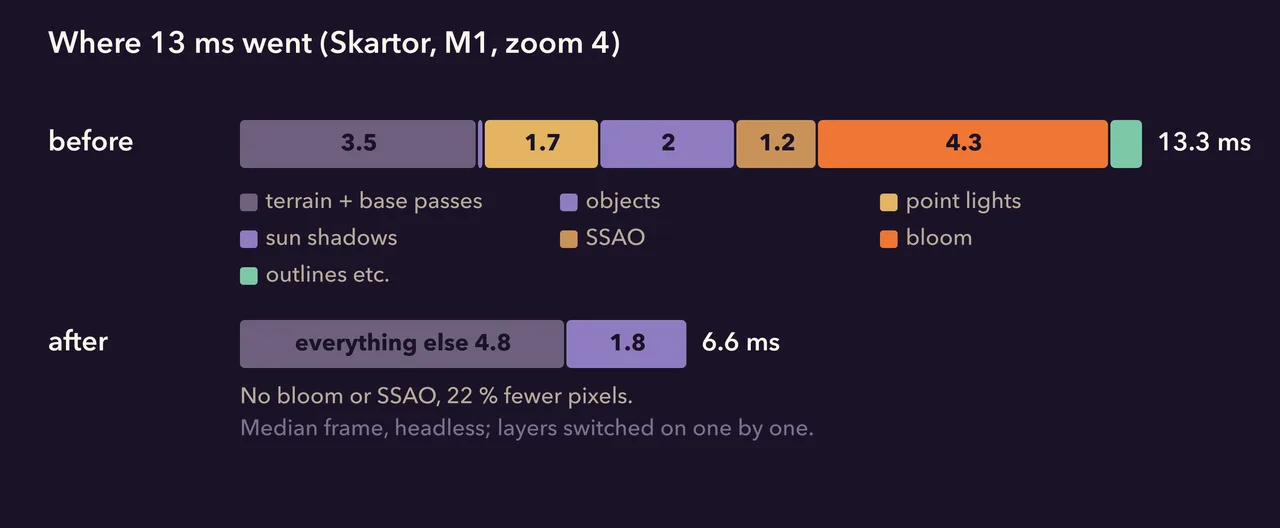
Two things stood out. The sprites themselves were nearly free, a tenth of a millisecond for almost eight hundred of them. And the two softest effects were the most expensive: bloom, the glow around bright lights, cost 4.3 ms, mostly in its sixteen small passes; ambient occlusion cost 1.2 ms for a darkening step that is hard to see at one pixel per texel. Both are gone (#114). Lamps and windows still glow by their own colour.
Walking without stutter
The bigger problem was not the average frame but the hitches. Walk into a new part of a town and the game froze for a fifth of a second, sometimes more. We suspected the atlas and replaced every object with a crate for one test run: the hitches vanished. But the atlas was not the cause. The cause was everything that happened the first time a sprite was needed. Its seven PNGs were decoded, its shadow shell built and simplified, and it was packed, all on the main thread, while the game waited.
Now all of that is done once, ahead of time. --build-sprite-pack decodes every sprite into one
file next to the game, about 180 MB with all three shadow levels, lz4-compressed per sprite. Each
entry carries a stamp of its source files, so a sprite that was re-baked since loads from its PNGs
instead (#115). The game reads from that file on two background threads, and the main thread only
places what arrived into the atlas, within a budget:
/// Most main-thread time per frame spent packing arrived sprites...
const RECEIVE_BUDGET: Duration = Duration::from_millis(3);
/// ...and most bytes sent to the GPU for them per frame.
const RECEIVE_BYTES: usize = 4 << 20;

while started.elapsed() < RECEIVE_BUDGET && bytes < RECEIVE_BYTES {
    let Ok(loaded) = lib.ready_rx.lock().unwrap().try_recv() else { break };
    // ...pack its frames into the atlas, upload its shadow shells
}
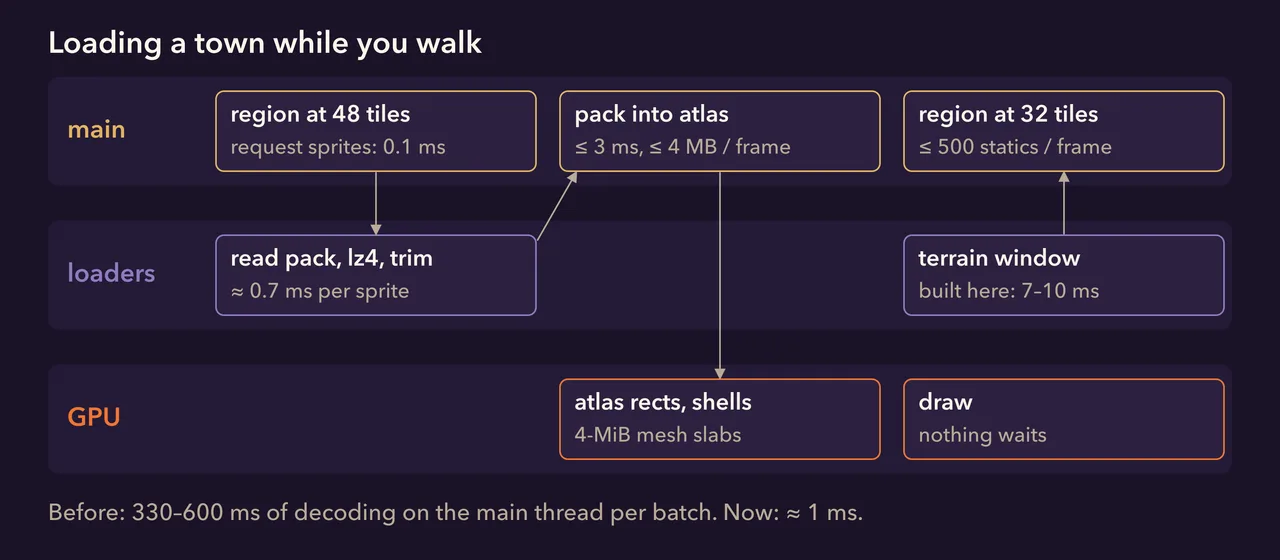
A region's sprites are requested when it comes within 48 tiles and its objects spawn at 32, so the sprites are almost always ready before the objects appear. Spawning itself is spread out too: at most 500 objects per frame, at most 1000 removed per frame when a region falls behind, and the ground under you is rebuilt on a background thread when you walk far enough (#118).
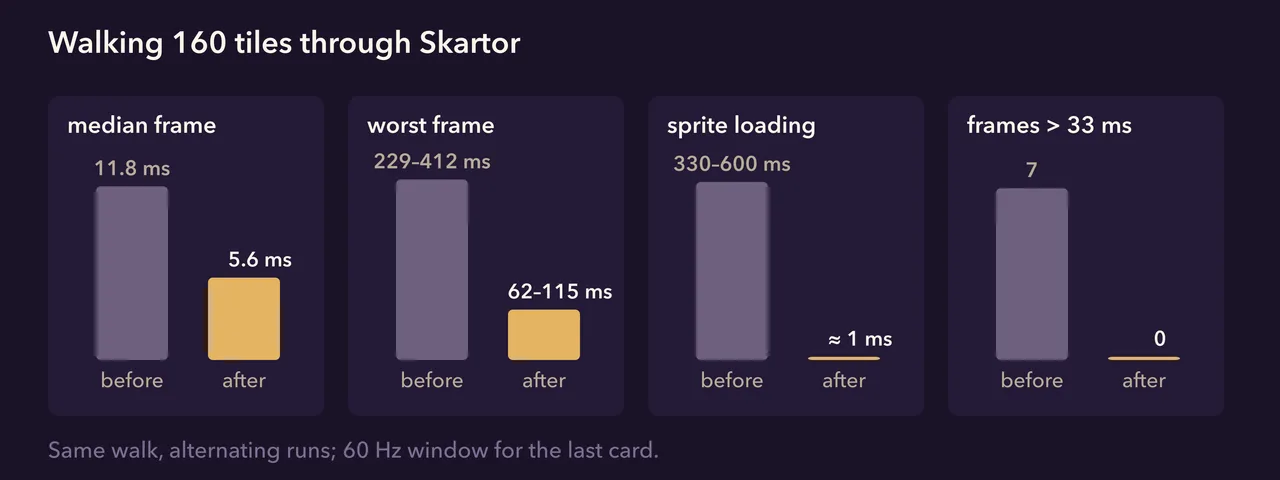
What Tracy saw
For the last few hitches we needed a finer tool. Bevy can record every system on every thread into Tracy, a frame profiler, and that showed two more things.
When a batch of sprites arrived, Bevy's buffers for their shadow shells grew in small steps of ×1.5, copying everything at each step: one frame of 11 ms per batch. They now start at 4 MiB and grow by ×4, and the spike is gone.
The second finding was stranger. In the slow frames that remained, the trace showed dozens of unrelated systems, things that normally take a hundredth of a millisecond, each stretched by exactly ten milliseconds. Ten milliseconds is the time slice of the macOS scheduler: the game's threads were being pushed off the processor by other programs, here a VPN client that kept most of the performance cores busy. The game cannot stop that, but it can ask nicely. The threads that build a frame now run at the highest everyday priority and the loaders at a low one (#117):
pub fn interactive() {
    #[cfg(target_os = "macos")]
    unsafe {
        libc::pthread_set_qos_class_self_np(libc::qos_class_t::QOS_CLASS_USER_INTERACTIVE, 0);
    }
}
With the VPN client paused, the same walk in a 60 Hz window ran without a single frame over 33 ms; the worst frame was 25 ms.
What is next
- A better atlas packer, so tall trees stop wasting most of a layer.
- Living light. Flames flicker on screen but not yet in the global illumination, and the light still changes in small steps when the sun has moved. Both are next for the lighting.
- More machines. Everything above was measured on one Apple M1. The shadow quality setting is the first step for weaker computers; when the playtest starts we will learn what else they need.
The full numbers, and how to measure the client yourself, are in the performance notes.
Comments
Join our Discord →Comments are the replies to this post’s thread in our Discord forum. They appear here a few seconds after they are posted.
The discussion thread opens on Discord shortly after a post goes live.